Table of Contents
Imagine spending eight, ten, even twelve hours a day with your fingers dancing across a keyboard. For developers, this isn’t just work—it’s the very conduit through which complex ideas transform into functional reality. That constant interaction demands more than a basic input device; it requires a precision instrument tailored to the unique rhythm of coding. The right keyboard becomes an extension of your thought process, reducing friction, minimizing fatigue, and ultimately, letting you focus on solving problems rather than fighting your tools. In the ever-evolving landscape of 2026, where efficiency and comfort are non-negotiable, the humble keyboard deserves serious strategic consideration.
Gone are the days when any off-the-shelf membrane keyboard sufficed. Today’s developers face intricate workflows, demanding syntax, and the physical toll of prolonged sessions. A programmable mechanical keyboard isn’t a luxury; it’s a productivity multiplier and a critical ergonomic safeguard. But navigating the sea of options can feel overwhelming. Should you prioritize switch feel, deep customization, or split ergonomics? How do you future-proof your investment? This guide cuts through the noise, focusing purely on the features and considerations that truly matter for your development environment. We’ll explore what makes a keyboard genuinely powerful for coding, empowering you to make a confident, informed decision based on your specific needs, not fleeting trends or brand hype.
Top 10 Programmable Mechanical Keyboards for Developers
Detailed Product Reviews
1. Keychron V1 75% Wired Mechanical Keyboard, QMK/VIA Programmable, Hot-swappable Red Switches, Compatible with Mac Windows Linux - Carbon Black

Overview: The Keychron V1 is a premium 75% mechanical keyboard targeting enthusiasts seeking customization and typing comfort. Its compact layout, acoustic foam, and hot-swappable switches cater to both productivity and gaming, with seamless macOS/Windows/Linux compatibility.
What Makes It Stand Out: QMK/VIA open-source firmware enables deep customization for layouts, macros, and backlighting. Hot-swap sockets support all major MX switches (3/5-pin), while pre-lubed red switches and PCB-mounted stabilizers ensure smooth, quiet keystrokes. Unique OSA-profile PBT keycaps and south-facing RGB lighting enhance ergonomics and visibility.
Value for Money: Priced mid-to-high, it justifies cost through exceptional build quality, future-proof modularity, and cross-OS support. Cheaper alternatives lack its customization depth or premium materials, making it a long-term investment for tinkerers.
Strengths and Weaknesses: Pros: Unmatched programmability; superb typing feel; versatile OS compatibility; durable PBT keycaps. Cons: No wireless option; RGB backlighting may feel excessive for minimalist users; limited to wired use.
Bottom Line: Ideal for customization-focused users and Mac/Windows hybrid workers. Despite the premium price, its modularity and build quality offer exceptional long-term value for keyboard enthusiasts.
2. Redragon Mechanical Gaming Keyboard Wired, 11 Programmable Backlit Modes, Hot-Swappable Red Switch, Anti-Ghosting, Double-Shot PBT Keycaps, Light Up Keyboard for PC Mac

Overview: The Redragon K671 is a budget-friendly wired mechanical gaming keyboard featuring hot-swappable red switches, anti-ghosting, and vibrant backlighting. It targets gamers and casual users seeking affordability without sacrificing core mechanical benefits.
What Makes It Stand Out: Hot-swap support (with 4 spare red switches) allows easy switch customization. Eleven backlight modes with adjustable speed/brightness and double-shot PBT keycaps provide durability and clear illumination. Dedicated macro editing via software enhances gaming efficiency.
Value for Money: Extremely cost-effective for entry-level users. Includes hot-swap capability and PBT keycaps rarely found at this price point. Competing budget keyboards often use inferior ABS keycaps or lack switch customization.
Strengths and Weaknesses: Pros: Excellent value; hot-swap convenience; solid anti-ghosting; included spare switches. Cons: Backlight color isn’t customizable; macro software feels basic; ABS keycaps (not PBT) on some variants.
Bottom Line: A top choice for budget-conscious gamers needing reliable performance and switch flexibility. Minor software limitations are overshadowed by its affordability and essential mechanical features.
3. Keychron C2 Pro Wired Custom Mechanical Keyboard Full Size Layout QMK/VIA Programmable Macro White Backlit with Linear Red Switch OEM Profile Double-Shot PBT Keycaps for Mac Windows Linux

Overview: The Keychron C2 Pro is a full-size wired mechanical keyboard designed for productivity, featuring QMK/VIA support, white backlighting, and OEM-profile PBT keycaps. It prioritizes typing comfort and cross-platform compatibility for professionals.
What Makes It Stand Out: Full QMK/VIA programmability enables complex macros and layouts across macOS/Windows/Linux. Premium non-backlight PBT keycaps resist shine and fading, while south-facing white LEDs ensure even illumination. The 1000Hz polling rate guarantees responsiveness.
Value for Money: Competitively priced for a full-size pro keyboard. Superior to similarly priced models with flimsier builds or limited OS support. The inclusion of PBT keycaps and open-source firmware justifies the investment for serious typists.
Strengths and Weaknesses: Pros: Exceptional typing experience; robust PBT keycaps; versatile OS integration; quiet white backlighting. Cons: No RGB lighting; wired-only design; backlight effects lack color variety.
Bottom Line: Highly recommended for office users and coders needing a reliable, customizable workhorse. Its focus on ergonomics and programmability delivers outstanding value in the productivity keyboard segment.
4. Vaydeer One-Handed Mechanical Keyboard Support NKRO, Hotkeys, One-Click Start,9 Fully Programmable Keys with Floating Window and Macro Multifunctional Keypad for iOS,Windows, Gift Idea for Him/Her

Overview: The Vaydeer one-handed macro keypad is a specialized productivity tool with nine programmable keys, designed to streamline workflows via macros, hotkeys, and app-specific layers. It targets gamers, designers, and office professionals.
What Makes It Stand Out: Six customizable functional layers adapt to different apps automatically. Real-time floating window shows active key functions, while OTA firmware updates and setting sharing enhance usability. Supports complex macros like one-click app launches and gaming combos.
Value for Money: A niche but justified purchase for efficiency seekers. At its price, it outperforms generic keypads with robust macro capabilities and cross-platform support (Windows/iOS). Ideal as a gift for power users.
Strengths and Weaknesses: Pros: Intuitive layer switching; excellent macro versatility; portable design; floating window utility. Cons: Limited to 9 keys (not a full keyboard); learning curve for setup; minimal gaming switch feedback.
Bottom Line: A must-have secondary device for boosting workflow efficiency. While not a primary keyboard, its macro depth and customization make it invaluable for repetitive tasks and gaming combos.
5. Redragon Mechanical Gaming Keyboard with Red Switches, Wired Keyboard Mechanical with RGB Backlit, Fully Progammable, Durable Aluminum Frame, Anti-Ghosting for PC Windows Mac, K565, Black

Overview: The Redragon K565 is a feature-packed wired gaming keyboard with an aluminum frame, RGB backlighting, and hot-swappable red switches. It emphasizes durability and immersive lighting for gamers on a budget.
What Makes It Stand Out: A rigid aluminum top plate (2.77 lbs) prevents sliding during intense sessions. Twenty RGB effects with 16.8M colors offer extensive personalization, while full-key anti-ghosting and 12 multimedia shortcuts enhance functionality. Includes four spare red switches.
Value for Money: Outstanding for its price. The metal build and RGB depth surpass cheaper membrane keyboards, and hot-swap capability rivals costlier models. A solid upgrade path for entry-level gamers.
Strengths and Weaknesses: Pros: Sturdy aluminum construction; vibrant RGB customization; reliable anti-ghosting; spare switches included. Cons: PBT keycaps not specified (likely ABS); software less intuitive than QMK; no Mac-specific keycaps.
Bottom Line: A top-tier budget gaming keyboard that balances flashy aesthetics with performance. Highly recommended for gamers prioritizing build quality and RGB without breaking the bank.
6. VSDINSIDE Macro Keyboard, Full-Key Programmable On-board Keypad, Stream Controller Deck Pad with Screen & Knob,Gasket Shortcut Mechanical KB for Gaming Streaming,Hot Swappable,RGB Backlight for PC Mac

Overview:
The VSDINSIDE Macro Keyboard is a specialized streamer and productivity tool featuring 6 programmable LCD keys, 3 custom knobs, and a dynamic screen. Designed for one-tap multitasking, it replaces complex workflows with intuitive visual controls, targeting gamers, streamers, and remote professionals seeking efficiency.
What Makes It Stand Out:
Its standout feature is the AI-driven visual macro system: LCD keys display custom icons for apps, URLs, or macros, while hardware-only, app-controlled, and web-based modes offer unparalleled flexibility. The gasket-mounted mechanical design ensures a premium typing feel, and hot-swappable switches cater to customization enthusiasts. RGB backlighting complements its sleek, functional aesthetic.
Value for Money:
Priced mid-to-high range, it justifies cost through versatility. Unlike single-mode stream decks, its triple-mode operation eliminates software dependency for basic tasks while enabling deep customization via the app or web portal. For streamers needing reliability and adaptability, it outperforms cheaper alternatives lacking hardware-software synergy.
Strengths and Weaknesses:
Strengths: Intuitive LCD feedback; three workflow modes; robust build quality; hot-swappable switches; silent gasket mount. Weaknesses: Steeper learning curve for full customization; limited key count (9 total) may frustrate heavy macro users; companion app required for advanced features.
Bottom Line:
Ideal for streamers and power users prioritizing visual workflow control, this deck excels where simplicity meets depth. Despite a modest key count, its hardware-software integration offers exceptional long-term value for $100–$150, warranting a strong recommendation for targeted productivity.
7. LEMOKEY X1 Wired Mechanical Keyboard, QMK Programmable TKL Layout with Pre-Lubed Tactile Switch, North-Facing Red Backlit NKRO Compatible with Windows

Overview:
The LEMOKEY X1 is a tenkeyless (TKL) mechanical keyboard emphasizing programmability and tactile feedback. With pre-lubed tactile switches, red backlighting, and QMK/VIA support, it targets gamers and coders seeking a compact, customizable typing experience without wireless compromises.
What Makes It Stand Out:
Its open-source QMK/VIA firmware enables deep customization—remapping keys, creating macros, or adjusting lighting—without proprietary software. The north-facing LEDs brilliantly illuminate ABS double-shot keycaps, while N-key rollover and 1000Hz polling ensure flawless input registration during intense use. The ARM-based MCU guarantees future-proof flexibility.
Value for Money:
At a budget-friendly price ($50–$70), it delivers premium features like full-key programmability and pre-lubed switches rarely found in this range. Competitors often sacrifice firmware openness or build quality; here, the TKL layout and robust anti-ghosting provide exceptional bang for buck for developers and gamers.
Strengths and Weaknesses:
Strengths: Smooth pre-lubed tactile switches; vibrant red backlighting; true NKRO; open-source QMK/VIA support; durable ABS keycaps. Weaknesses: ABS keycaps prone to shine over time; limited to red backlight (no RGB); no wireless option; basic plastic construction.
Bottom Line:
A stellar entry-level TKL board for customization-focused users, the X1 punches above its weight with QMK flexibility and reliable performance. Its minor durability trade-offs are overshadowed by value, making it a top pick for budget-conscious tinkerers and typists.
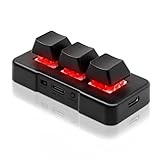
8. PCsensor 3 Key Mini Keypad Wireless USB 2 in 1 Mechanical Gaming Macro Keyboard Customized Programmable OSU Keypad with RGB Led for PC Gaming OSU Office Work HID
Overview:
The PCsensor 3 Key Mini Keypad is an ultra-compact wireless macro pad designed for niche tasks. With just three mechanical keys, RGB lighting, and broad OS compatibility, it serves OSU! gamers, office workers, or anyone needing instant shortcut access via a pocket-sized device.
What Makes It Stand Out:
Its wireless versatility and multi-OS support (Windows, Mac, Linux, Android, iOS) are exceptional for such a small device. The 50-million-stroke durability and 3-month battery life per charge cater to heavy use, while RGB lighting adds flair. The “2-in-1” USB/Wireless design ensures seamless transitions between devices.
Value for Money:
Priced under $30, it’s ideal for specific needs like OSU! gameplay or presentation controls. Though limited to three keys, its rugged build and cross-platform reliability outshine similarly priced pads. Not a full keyboard replacement, but unmatched for dedicated macro tasks at this size and cost.
Strengths and Weaknesses:
Strengths: True wireless freedom; exceptional battery life; broad OS compatibility; durable mechanical switches; compact portability. Weaknesses: Only 3 programmable keys; basic configuration software; no onboard memory for macros across devices; RGB is purely decorative.
Bottom Line:
A hyper-specialized tool for gamers or presenters needing instant shortcuts, this pad excels in its narrow niche. While not versatile, its reliability and affordability make it a no-brainer for targeted use cases—highly recommended if three keys suffice.
9. Keychron C2 Pro Wired Custom Mechanical Keyboard Full Size Layout QMK/VIA Programmable Macro White Backlit with Tactile Brown Switch OEM Profile Double-Shot PBT Keycaps for Mac Windows Linux

Overview:
The Keychron C2 Pro is a full-size wired mechanical keyboard blending premium build quality with cross-platform flexibility. Featuring QMK/VIA programmability, tactile brown switches, and double-shot PBT keycaps, it targets professionals and enthusiasts who demand durability and macOS/Windows compatibility.
What Makes It Stand Out:
OEM-profile PBT keycaps resist shine and fading, while south-facing white LEDs optimize backlight visibility. Full QMK/VIA support enables granular customization across macOS, Windows, and Linux, and the 1000Hz polling rate ensures responsiveness. Its wired stability avoids wireless latency, ideal for critical typing tasks.
Value for Money:
Priced at $80–$100, it competes fiercely with mid-range boards. The inclusion of PBT keycaps (often reserved for pricier models), triple-OS support, and open-source firmware delivers superior longevity and adaptability versus similarly priced alternatives with inferior keycaps or closed ecosystems.
Strengths and Weaknesses:
Strengths: Premium PBT keycaps; excellent cross-OS compatibility; stable wired connection; customizable white backlighting; tactile switch feedback. Weaknesses: Wired-only (no wireless option); white backlight lacks RGB flair; full-size layout may overwhelm desk space.
Bottom Line:
A refined, professional-grade keyboard for typists prioritizing comfort and longevity. The C2 Pro’s build quality and open firmware justify its price, making it a standout recommendation for writers, developers, and macOS users seeking a no-nonsense wired workhorse.
10. Redragon K580 VATA RGB LED Backlit Mechanical Gaming Keyboard with Macro Keys & Dedicated Media Controls, Hot-Swappable Socket, Onboard Macro Recording (Blue Switches)

Overview:
The Redragon K580 VATA is a feature-packed mechanical gaming keyboard with 5 dedicated macro keys, hot-swappable sockets, and vibrant RGB lighting. Targeting budget gamers, it combines tactile blue switches, media controls, and customizable backlighting in a tenkeyless design.
What Makes It Stand Out:
Onboard macro recording (no software needed) and a physical volume wheel simplify in-game adjustments. Its near-universal hot-swap compatibility (3/5-pin switches) and 50-million keystroke rating promise longevity, while 18 RGB backlight modes and edge lighting create immersive aesthetics without complex setup.
Value for Money:
At $60–$80, it’s a macro-focused powerhouse. Few boards in this range offer both hot-swap sockets and dedicated media controls. While build uses plastic, the included blue switches (tactile/clicky) and macro versatility deliver exceptional gaming utility for the price.
Strengths and Weaknesses:
Strengths: Software-free macro recording; intuitive volume wheel; hot-swappable switches; bright RGB customization; durable keycaps. Weaknesses: Plastic construction feels less premium; blue switches noisy for offices; RGB software limited versus competitors.
Bottom Line:
A compelling budget gaming keyboard for macro enthusiasts who value tactile feedback and immediate customization. Despite minor build compromises, its feature density and hot-swap flexibility make it a top recommendation for gamers seeking affordability without sacrificing core functionality.
Understanding the Core Value of Programmability for Developers
Programmability transforms a static tool into a dynamic workflow accelerator. It’s about bending the keyboard to your logic, not the other way around.
Beyond Basic Remapping: True Workflow Integration
Simple key remapping is just the starting point. Advanced programmability allows for complex macro sequences that automate repetitive coding tasks, execute intricate commands with a single keystroke, or dynamically adjust based on the active application or programming language environment you’re using, streamlining context switching.
The Power of Layers: Context-Specific Key Functions
Layers are fundamental. Imagine having one set of keys for navigation and editing in your IDE, seamlessly switching to another layer optimized for terminal commands or version control shortcuts, and a third for media or communication apps—all without moving your hands from the home row, drastically reducing mouse dependency.
Open-Source Firmware: Control and Longevity
Keyboards supporting open-source firmware (like QMK or ZMK) offer unparalleled flexibility and community-driven updates. This ensures your device remains customizable for years, receives security patches, and allows deep tinkering—not just superficial changes—providing true future-proofing against obsolescence.
Decoding Mechanical Switches: Feel is Everything
The switch under your finger dictates the tactile and auditory experience, directly impacting typing speed, accuracy, and endurance during marathon coding sessions.
Linear vs. Tactile vs. Clicky: Matching Switch to Coding Style
Linear switches (smooth press) suit rapid typists seeking speed; tactile switches (subtle bump) provide crucial feedback without noise, ideal for most developers; clicky switches (audible click) offer maximum feedback but can be disruptive in shared spaces—your personal preference and environment are paramount.
Actuation Force and Travel: Balancing Speed and Fatigue
Consider the force required to register a keypress (actuation force) and the distance the key travels. Lower force (e.g., 45g) reduces finger strain over hours, while shorter travel distance (e.g., 3.6mm) enables faster key repeats. Finding the sweet spot between responsiveness and comfort is key for sustained focus.
Switch Hot-Swappability: Future-Proof Your Feel
Keyboards with hot-swap sockets let you physically change switches without soldering. This is invaluable for experimenting to find your perfect tactile profile or replacing worn-out switches years down the line, significantly extending the keyboard’s usable lifespan and personalization potential.
Build Quality and Ergonomics: Investing in Your Physical Well-being
A keyboard is a long-term companion; its construction and form factor directly impact your physical health during countless hours of use.
Robust Construction: Materials That Last
Prioritize frames made from aluminum or high-quality ABS/PC plastics that resist flex and wobble. Sturdy construction ensures consistent keypresses, reduces fatigue from an unstable base, and withstands the rigors of daily development life far better than flimsy alternatives.
Ergonomic Form Factors: Reducing Strain Proactively
Explore options beyond the standard rectangle. Angled tenting, columnar staggered layouts, or fully split designs actively promote a more natural hand and wrist position, significantly mitigating the risk of repetitive strain injuries (RSI) that plague many developers over time.
Keycap Material and Profile: Comfort Under Your Fingertips
Doubleshot PBT keycaps resist shine and wear, maintaining texture. Spherical or ergonomic profiles (like DSA or MT3) often provide better finger alignment than traditional OEM or Cherry profiles, reducing lateral finger movement and fatigue during extended typing.
Connectivity and Portability: Adapting to Your Workspace
Your workflow isn’t confined to one desk. How your keyboard connects and moves matters for modern development environments.
Wired vs. Wireless: Latency and Reliability Considerations
Wired (USB-C) offers absolute zero latency—critical for some—but modern Bluetooth 5.3+ and 2.4GHz wireless dongles provide near-undetectable lag with excellent battery life (often weeks or months). Prioritize keyboards offering both options for maximum flexibility across workstations.
Multi-Device Pairing: Seamless Workspace Switching
The ability to pair with and instantly switch between 3 or more devices (laptop, desktop, tablet) via dedicated keys is essential for developers juggling multiple machines. Look for stable, low-friction switching that doesn’t disrupt your flow.
Compact Layouts: Maximizing Desk Real Estate
Consider 75%, 65%, or even 60% layouts. Removing the numpad and excess keys creates valuable space for your mouse or reference materials, promoting better posture. Programmability ensures you don’t lose functionality—reclaim those keys through layers and macros.
Advanced Customization Features for Power Users
Beyond basic programming, certain features cater specifically to the intricate demands of development workflows.
On-Board Memory Profiles: Take Your Setup Anywhere
Keyboards with sufficient onboard memory store multiple complex layer configurations and macros on the device itself, not just in software. This means your meticulously crafted setup works instantly on any computer, even a locked-down work machine or a borrowed system.
Per-Key RGB and Underglow: More Than Just Aesthetics
While customizable lighting is visually appealing, dynamic lighting based on layer, active application, or even system status (like build success/failure) provides valuable, glanceable feedback without breaking concentration on your code.
Integrated Trackpoints or Touch Strips: Reducing Mouse Dependency
Some advanced models incorporate a pointing stick (like a ThinkPad) or a small touch-sensitive strip directly on the keyboard. This allows for precise cursor control without moving your hands to the mouse, speeding up navigation within code editors and IDEs.
Durability and Maintenance: Ensuring Long-Term Reliability
A developer’s keyboard faces intense daily use; it must be built to endure.
Switch Lifespan Ratings: Beyond the Hype
While most quality mechanical switches are rated for 50-100 million presses, consistency matters more than the peak number. Look for reputable switch manufacturers known for consistent performance over time, as inconsistent feel mid-project is highly disruptive.
Cleanability: Designing for Real-World Use
Spills and debris happen. Keyboards with easily removable keycaps (using standard pullers) and designs that minimize crevices where crumbs accumulate are crucial for hygiene and maintaining smooth keypresses over years of service.
Manufacturer Support and Community: Beyond the Purchase
Strong manufacturer support for firmware updates and responsive customer service are vital. An active user community often provides invaluable resources, custom firmware builds, troubleshooting help, and shared keymap configurations specific to development tasks.
Making the Right Choice for Your Unique Workflow
The “best” keyboard is deeply personal, dictated by your specific physical needs, coding habits, and environment.
Assessing Your Primary Coding Environment
Are you glued to a single ergonomic desk setup, or constantly moving between home office, coffee shop, and co-working space? This drastically influences priorities like portability, wireless reliability, and the need for a travel case versus maximum desk stability.
Identifying Your Biggest Pain Points
What slows you down or causes discomfort right now? Is it wrist strain (prioritize ergonomics), hunting for obscure symbols (prioritize layers/macros), or constant mouse use (look for integrated pointing)? Solve your most pressing issue first.
Budgeting for Long-Term Value, Not Just Cost
View this as a multi-year investment in your health and productivity. A higher initial cost for superior build quality, essential ergonomic features, and deep programmability often delivers far better value over 5+ years than a cheaper model that needs replacing due to wear, discomfort, or lacking critical features.
Frequently Asked Questions
What is the single most important feature for a developer’s programmable keyboard?
Deep, reliable programmability (like open-source firmware support) is paramount, as it allows you to tailor the keyboard precisely to your unique workflow, automate repetitive tasks, and adapt to evolving needs over time, directly impacting daily efficiency.
Can a programmable keyboard actually reduce the risk of repetitive strain injury (RSI)?
Yes, significantly. Features like ergonomic form factors (splits, tenting), columnar staggered layouts, and proper keycap profiles promote neutral wrist and finger positions. Programmability also minimizes mouse usage through macros and layers, reducing strain from constant context switching.
Are wireless programmable keyboards reliable enough for fast-paced coding?
Absolutely. Modern keyboards using Bluetooth 5.3+ or dedicated 2.4GHz dongles offer latency indistinguishable from wired connections for typing. Prioritize models with strong battery life (weeks/months) and the option for wired use if absolute zero latency is mission-critical for you.
How crucial is switch hot-swappability for a developer?
It’s highly valuable for long-term use. It allows you to experiment to find your perfect tactile feel without commitment and replace worn switches years later, extending the keyboard’s lifespan and ensuring consistent performance as your preferences might evolve.
Do I need RGB lighting as a developer, or is it just a gimmick?
While often seen as aesthetic, dynamic RGB can be functional. It can visually indicate active layers, show system status (e.g., green for build success, red for error), or highlight modifier keys, providing useful glanceable feedback within your coding environment.
What layout percentage (60%, 65%, 75%, TKL) is best for programming?
There’s no universal “best.” Compact layouts (60-75%) save desk space but require more layer usage. TKL (80%) keeps the navigation cluster. Prioritize based on your need for dedicated keys versus desk space and ensure the keyboard’s programmability fully compensates for any missing keys via layers.
How do I evaluate the true quality of a keyboard’s build?
Look beyond specs: Seek reviews focusing on frame rigidity (minimal flex/wobble when typing forcefully), sound when tapped (solid vs. hollow), and keycap material (PBT preferred). A sturdy build ensures consistent keypresses and reduces fatigue from an unstable base.
Why is open-source firmware (QMK/ZMK) considered superior for developers?
It offers the deepest level of customization, community-driven updates and security patches, independence from manufacturer software deprecation, and the ability to share and use complex community-created keymaps tailored for specific IDEs or workflows.
Can a good programmable keyboard improve my actual coding speed?
Indirectly, yes. By reducing physical strain, minimizing hand movement (through optimized layouts and macros), eliminating the need to search for keys, and decreasing mouse dependency, you maintain focus and flow state longer, leading to more productive and faster effective coding.
How long should I realistically expect a quality mechanical keyboard for developers to last?
With proper care (regular cleaning, avoiding spills), a keyboard with a metal frame, quality PBT keycaps, and reputable switches should easily last 5-10 years of daily development use. Hot-swap sockets and open-source firmware further extend functional longevity through customization and repair.
See Also
- 10 Expert-Recommended Tactile Mechanical Keyboards for Typing Accuracy in 2026
- 10 Expert-Recommended Tactile Mechanical Keyboards for Typing Enthusiasts in 2026
- Stop Wasting Time with Macro Lag: 10 Best Programmable Mechanical Keyboards This Year
- The 10 Most Revolutionary Programmable Mechanical Keyboards of 2026
- Best Mechanical Keyboards for Content Creators: 10 Expert Picks for 2026